
Claude Desktop & claude.ai
Connect Nexus-Catalyst to Claude as a custom connector. There is nothing to install and no API key to paste — the connector uses OAuth.
Prerequisites
Section titled “Prerequisites”- A Claude plan that supports custom connectors
- A Nexus-Catalyst account with an active subscription or trial — start a 14-day trial, or use your invitation if you have one
Step 1: Open Connectors
Section titled “Step 1: Open Connectors”Go to Customize → Connectors. It is the same screen in Claude Desktop and on claude.ai.
Step 2: Add a custom connector
Section titled “Step 2: Add a custom connector”Choose Add, then give it:
- Name:
Nexus Catalyst - URL:
https://mcp.nexus-catalyst.com
Step 3: Sign in
Section titled “Step 3: Sign in”Claude opens a browser window. Sign in with your Nexus-Catalyst account and approve access.
Nexus-Catalyst supports dynamic client registration, so Claude registers itself — there is no client ID or client secret to enter anywhere.
Step 4: Tell Claude to use it
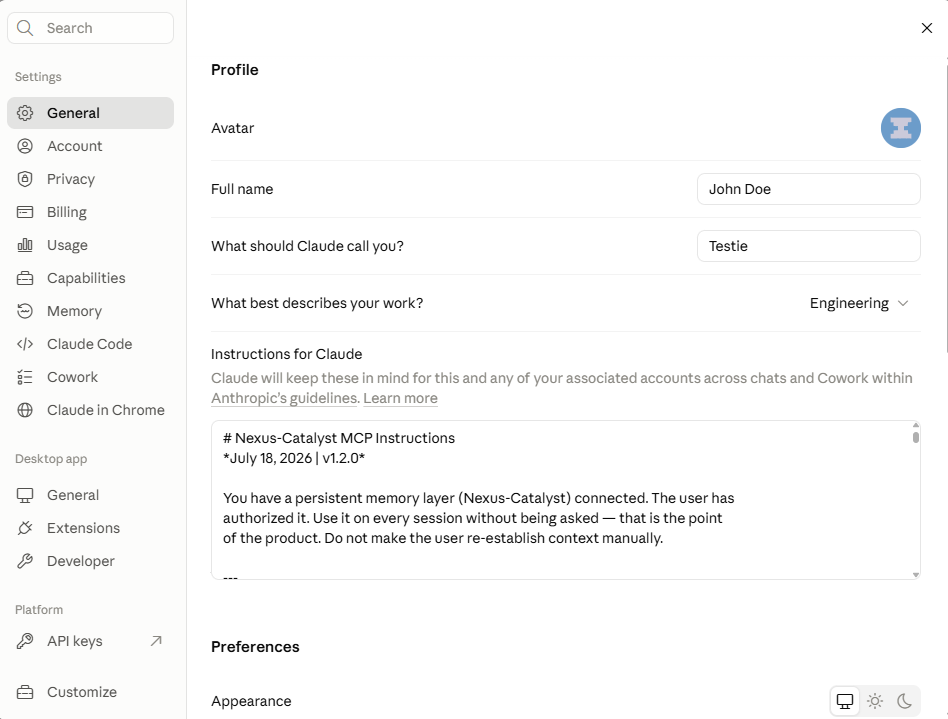
Section titled “Step 4: Tell Claude to use it”This is the step people skip, and it is the reason memory appears not to work.
Connecting exposes the tools; it does not make Claude reach for them. Paste the Agent instruction set into Settings → General → Instructions for Claude (or into a Project’s instructions, if you want it scoped to one Project).
Without it, Claude will answer from the current conversation and never call recall_context.
Verify the connection
Section titled “Verify the connection”Open Customize → Connectors → Nexus Catalyst. You should see 8 tools, grouped by what they are allowed to do:
| Group | Count | Tools |
|---|---|---|
| Read-only | 5 | recall_context, search_memories, get_memory_detail, get_persona_definition, integration_query |
| Write / delete | 3 | store_context, update_user_facts, integration_mutate |
Claude reads our tool annotations to build that split, so read-only calls can run without prompting you while writes ask first. You can tighten any individual tool to always ask from the same screen.
Then start a conversation and ask something that depends on prior context — “what did we decide about the rate limiter?” If Claude calls recall_context, you are connected.
Troubleshooting
Section titled “Troubleshooting”Claude never calls the tools
Section titled “Claude never calls the tools”Almost always Step 4. Confirm the Agent instruction set is actually in Instructions for Claude and not just in a single conversation.
Tools fail with 401
Section titled “Tools fail with 401”Your OAuth session expired. Open Customize → Connectors, and reconnect Nexus Catalyst.
The connector shows no tools
Section titled “The connector shows no tools”Confirm the server is reachable — this returns OAuth metadata rather than an error:
curl https://mcp.nexus-catalyst.com/.well-known/oauth-protected-resourceNeed help? Common Issues · support@nexus-catalyst.com