
Perplexity Setup
Perplexity connects to Nexus-Catalyst as a custom MCP connector. Nothing to install, and no API key — you add a URL and sign in through your browser.
Prerequisites
Section titled “Prerequisites”- A Perplexity plan that supports custom connectors
- A Nexus-Catalyst account with an active subscription or trial — start a 14-day trial, or use your invitation if you have one
Step 1: Open Connectors
Section titled “Step 1: Open Connectors”Choose Customize in the left sidebar, then the Connectors tab.

Step 2: Add the server
Section titled “Step 2: Add the server”Press + Custom connector at the top right, then Add MCP Connector.
- Name:
Nexus Catalyst - Description: optional, and only for your own reference — unlike ChatGPT, Perplexity does not use it to decide when to call the connector
- MCP server URL:
https://mcp.nexus-catalyst.com
Leave Advanced alone; nothing under it is needed. Tick the box acknowledging that custom connectors carry risk, then press Add.
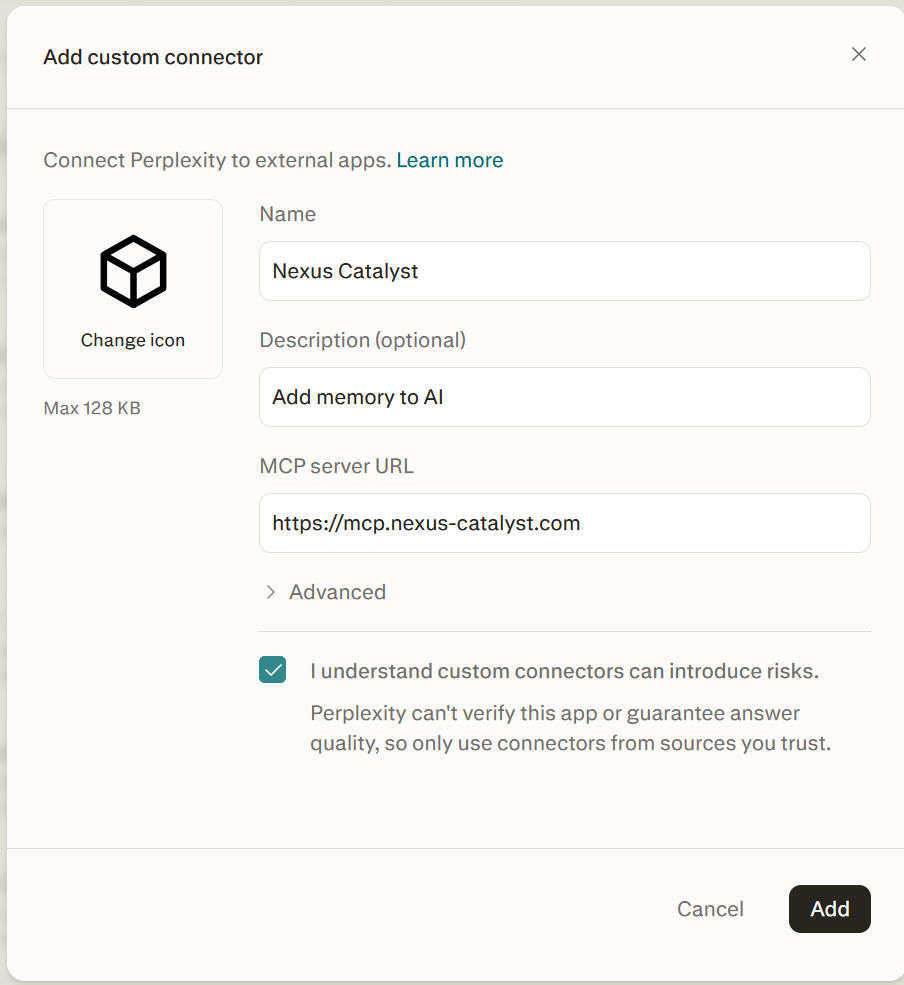
Note what the form does not ask for: there is no client ID and no client secret field.
Step 3: Sign in
Section titled “Step 3: Sign in”Adding the connector sends you straight to the browser sign-in. Sign in with your Nexus-Catalyst account and approve access.
If a guide tells you to generate a client ID and secret by hand, it is describing a different server.
Step 4: Add the instruction set
Section titled “Step 4: Add the instruction set”Connecting exposes the tools; it does not make Perplexity reach for them.
Add the Agent instruction set to your Perplexity instructions. Without it you will get answers from the conversation in front of you and recall_context will never be called.
What to expect
Section titled “What to expect”Perplexity asks you to confirm before it recalls. You will see a prompt on each lookup, with wording along the lines of “Nexus-Catalyst treats its session recall operation as an external-state action.”
That prompt is Perplexity’s, not ours, and the underlying claim is not accurate: recall_context is annotated readOnlyHint: true, destructiveHint: false, idempotentHint: true, and it only reads. Clients that honour those annotations — Claude and ChatGPT among them — run recall without asking and prompt only on writes.
Nothing is wrong with your setup when you see it. Approve the prompt and recall works normally. A smoother flow here is on the roadmap.
Verify the connection
Section titled “Verify the connection”Once connected you should have 8 tools available:
| Group | Count | Tools |
|---|---|---|
| Read-only | 5 | recall_context, search_memories, get_memory_detail, get_persona_definition, integration_query |
| Write / delete | 3 | store_context, update_user_facts, integration_mutate |
Then ask something that depends on earlier context — “what did we decide about the rate limiter?” If Perplexity calls recall_context, you are connected.
Troubleshooting
Section titled “Troubleshooting”Perplexity never calls the tools
Section titled “Perplexity never calls the tools”Almost always Step 4. Confirm the Agent instruction set is in your Perplexity instructions and not just pasted into one thread.
It asks permission every single time I recall
Section titled “It asks permission every single time I recall”Expected, and not a fault in your setup — see What to expect above.
Tools fail with 401
Section titled “Tools fail with 401”Your OAuth session expired. Remove the connector and add it again to sign back in.
The connector shows no tools
Section titled “The connector shows no tools”Confirm the server is reachable — this returns OAuth metadata rather than an error:
curl https://mcp.nexus-catalyst.com/.well-known/oauth-protected-resourceNeed help? Common Issues · support@nexus-catalyst.com